
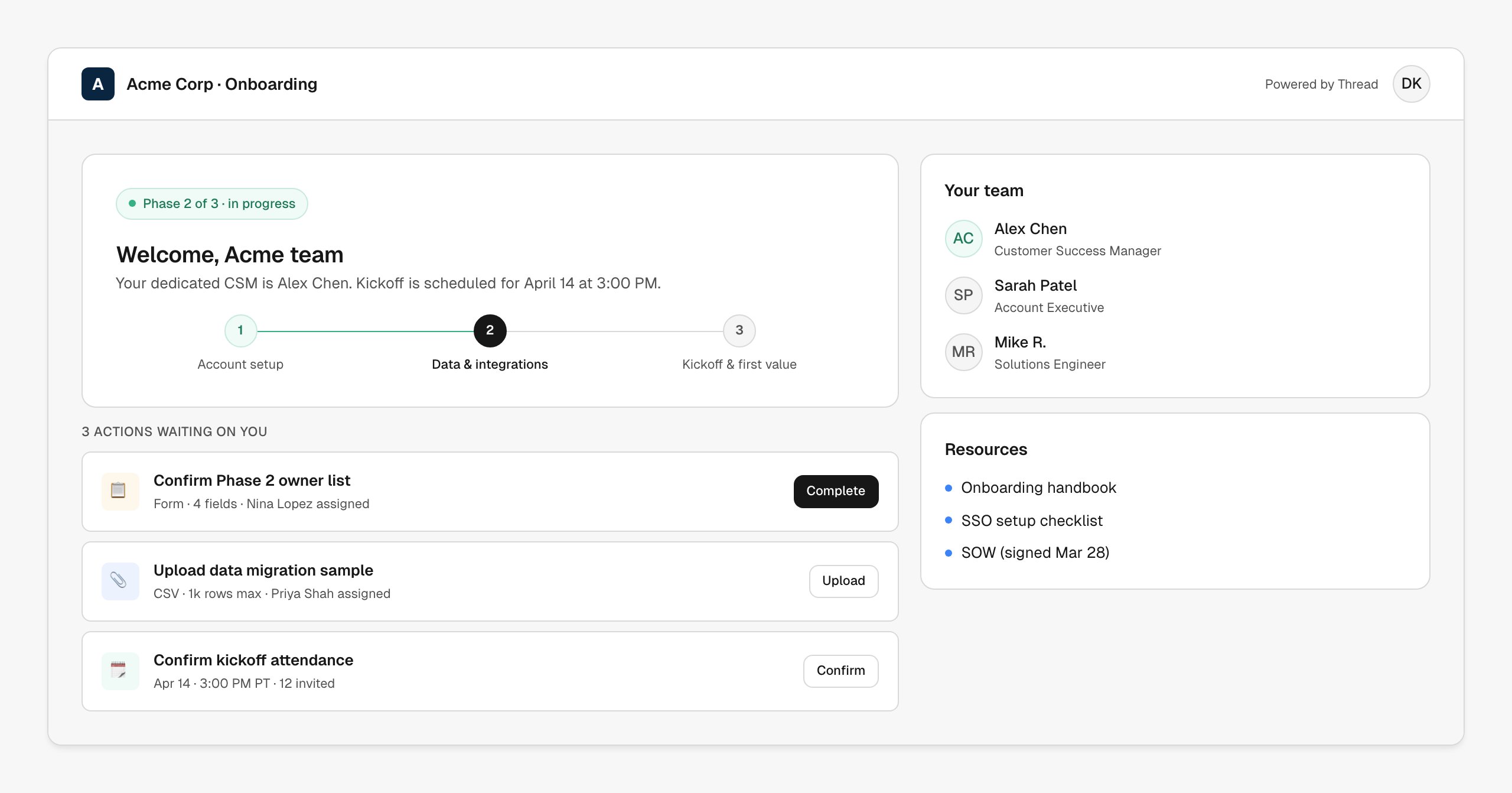
What it looks like
A clean, focused page: where they are in the journey (the stepper), what’s waiting on them right now (the action cards), and who they can reach (the team). Resources — handbooks, signed docs, setup guides — sit in a sidebar. No app to install, no password to manage; the customer accesses via a tokenized link. Everything is the same plan you see internally — same phases, same milestones, same task statuses. Updates from either side propagate immediately.How it’s wired up
The portal is generated automatically when an account is created. You control:| Configuration | Where |
|---|---|
| Branding (logo, colors, footer copy) | Settings → Branding |
| Visible plan content | Per-task visibility toggle in the success plan template |
| Customer-facing actions | Action types tagged “customer-facing” (forms, uploads, scheduling, sign-offs) |
| Team contacts shown | Auto-populated from the workflow (CSM, AE, optional SE/PM) |
- Form — customer fills out structured info (use cases, technical requirements, attendee lists)
- Upload — customer drops files (signed SOW, sample data, branding assets)
- Sign-off — customer marks a milestone complete on their side
- Schedule — customer picks a time from your team’s calendar
Customize the experience
The portal is heavily customizable per account or per workflow:- Re-skin per customer (some teams white-label entirely; others co-brand)
- Hide or show the team contacts panel
- Pin custom resources per account (their kickoff deck, their SOW)
- Adjust the stepper phases to match your motion
When to use it
- Always on for onboarding. The stepper + actions experience is the lowest-friction way to keep customers moving.
- Especially valuable when your customer team is more than two people, when you have shared Slack channels but want a “single source of truth,” or when handoffs across customer functions (champion → admin → end-user) need a visible plan.
Next steps
Branding
Make the portal feel like yours.
Success plans
What the customer sees on the plan side.
Slack
Pair the portal with shared Slack channels for daily comms.