
What you can build
Customer handover
Brief drafts that quote the actual sales calls, with stakeholders and risks pulled from transcripts.
Success plans
Plans tailored to what the customer actually said they wanted, not a generic template.
SOW analysis
Compare what was promised on calls against what’s in the SOW. Surface mismatches before kickoff.
Risk surfacing
Pull timeline pressure, exec doubts and competitor mentions into the account view automatically.
Connect Gong
Open Connectors → Gong → Connect
Go to Connectors → Gong in Thread, click Connect, and sign in to Gong as an admin to approve the OAuth scope. Thread reads call metadata, transcripts and insights — recordings stay in Gong and play back from there.
Choose what Thread can see
Under Connectors → Gong, pick a scope: All recordings, Selected teams, or Deal-associated only. Gong’s own permission model still applies — users only see what they could see in Gong.
What ends up on the account
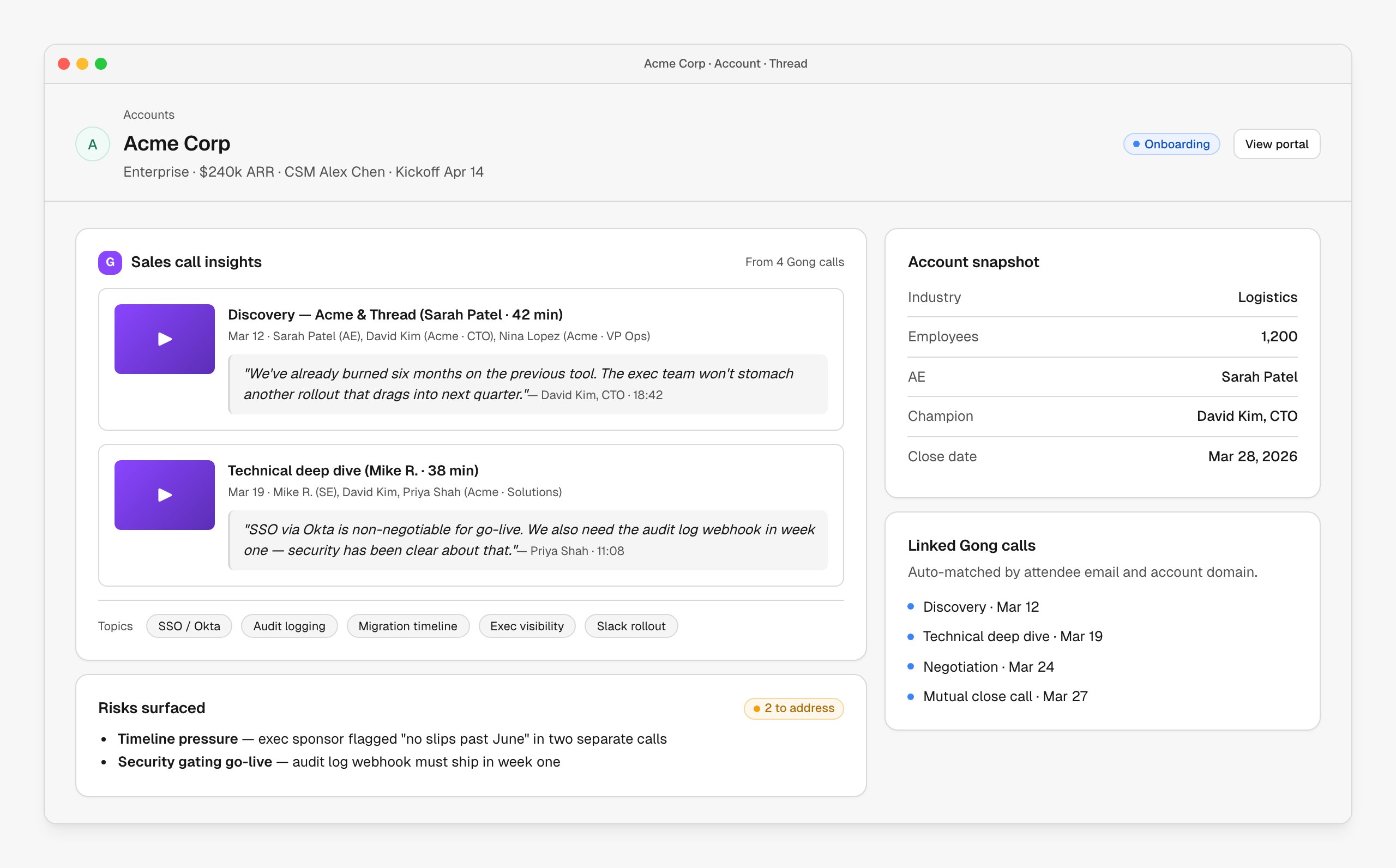
Open any account in Thread and the right calls are already attached. Quotes flow into the handover draft, topics turn into pills, and recurring concerns get pulled into a “Risks surfaced” panel.| Source | Where it shows up |
|---|---|
| Call metadata (date, attendees, type) | Linked calls list on the account |
| Full transcript | Searchable inside the account; piped into AI prompts |
| Topic & question insights | Topic pills under the call insights panel |
| Sentiment / next steps | Risks and action items panels |
Tips from the field
Link calls to opportunities
Gong calls connected to a CRM deal match more reliably than calls keyed by email alone.
Encourage rich naming
Call titles like “Discovery — Acme & Thread” beat “Sales call.” It’s what shows up in the brief.
Review before kickoff
Five minutes scanning the call insights panel saves twenty minutes in the kickoff meeting.
Watch the risks panel
Timeline pressure, security gating and exec doubt are all worth catching before week one.
Troubleshooting
No calls on a new account
No calls on a new account
Calls match by attendee email and company domain. If the AE used a personal Zoom account or the CRM contact email doesn’t match the call attendees, links won’t form. Add the right contact in Salesforce/HubSpot, or link a call manually from the account view.
Transcripts missing
Transcripts missing
Gong only generates transcripts for recorded calls, and processing can lag a few minutes after the call ends. If a recording is older than a day and still has no transcript, check the recording’s settings in Gong.
Connection failed
Connection failed
Confirm you have Gong admin permissions and that API access is enabled on the org. Reconnecting from Connectors → Gong issues a fresh token.
Next steps
Customer handover
See how call transcripts power the AI-drafted handover brief.
SOW analysis
Bring call commitments into a SOW review.