
Voice Studio is visible to org admins, like the other Guides authoring surfaces. See
User management.
Create an agent
Click New voice agent. Two doors:- Build agent — describe the call in plain language (“Call new customers about a week after they sign up to check that setup is finished…”) and Thread drafts the agent for you, opening it pre-filled in the editor. Starter examples — an activation call, a win-back, a renewal check-in — are one click away.
- Start from scratch — a blank agent, straight into the editor.
The editor
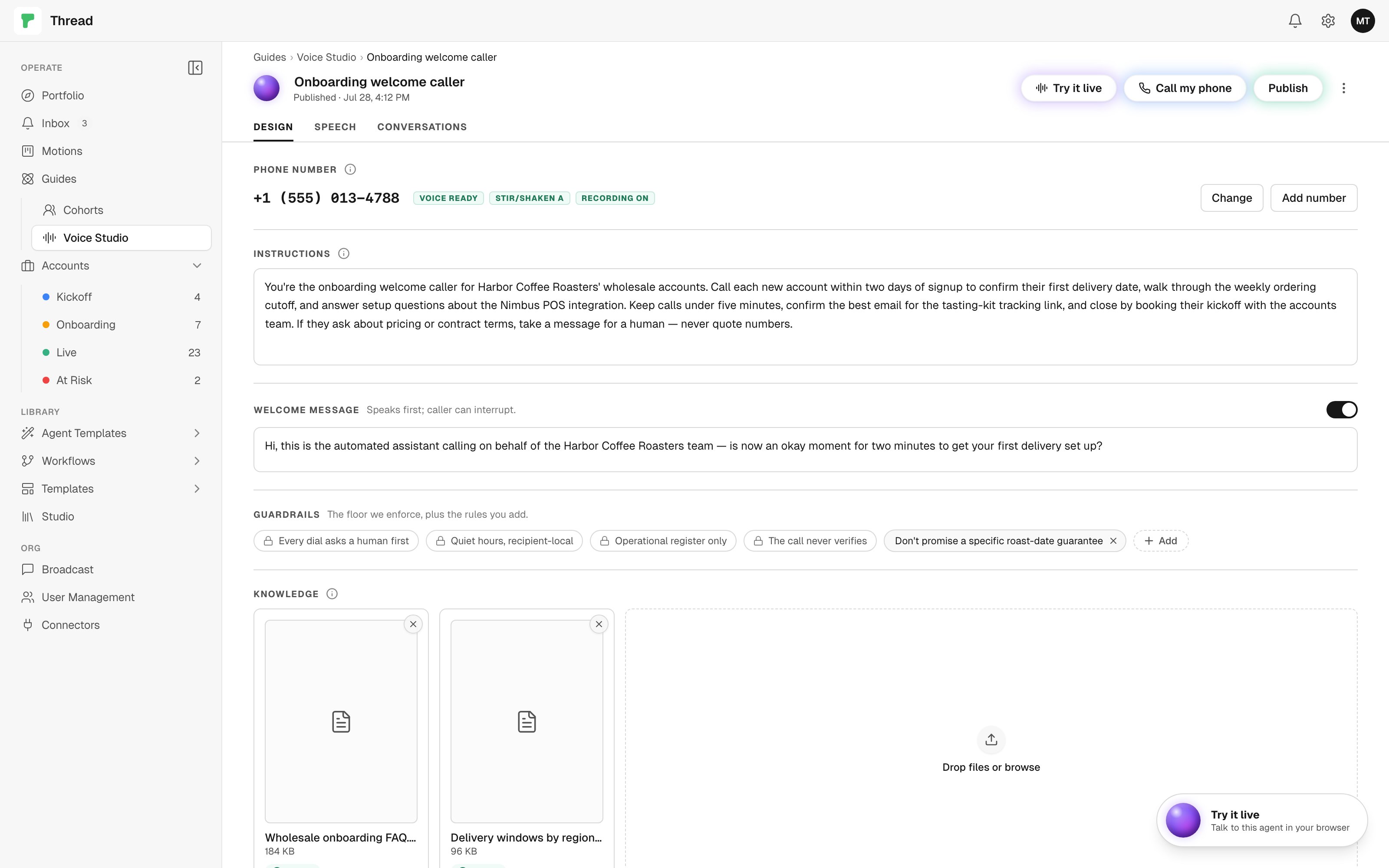
The editor has three tabs — Design, Speech, and Conversations — with the agent’s name and orb up top and three actions in the header: Try it live, Call my phone, and Publish. Edits autosave as you type; Publish is the only explicit commit.Design
- Phone number — the number the agent calls from. Pick one of your organization’s numbers or buy one; see Phone and registration.
- Instructions — the persona: the goal of the call, the facts it may use, and how it should close. A disclosure rule is added at publish and can’t be edited out: the agent is an automated assistant and says so plainly whenever a caller asks.
- Welcome message — an optional first spoken line (the caller can interrupt it). Write one and it becomes the agent’s real opening line in place of the pinned disclosure line, which then comes only when a caller asks.
- Recorded — one switch under the welcome message, off unless you turn it on, deciding whether this agent stores the audio of its calls. With it on and a welcome that doesn’t mention recording, a dashed Add “on a recorded line” appears beside it and drops that phrase at your cursor, so it weaves into your own sentence. You don’t have to click it: publish adds the disclosure sentence to the opening line if you don’t. See recording.
- Guardrails — four locked rules the platform enforces regardless of what you write, plus any rules you add in plain language (e.g. “Don’t promise a specific go-live date”). A fifth, Recorded, and said out loud, appears only while the Recorded switch is on. The enforced floor: Studio dials ask a human first — Try it live and Call my phone are started by a person, one call per click, to consented numbers only (a call a guide places with this agent follows that guide’s own approval setting); quiet hours, recipient-local — no dial 8pm–8am in the recipient’s timezone, and an unknown timezone blocks; operational register only — no promotional offers, because marketing calls carry the strictest consent bar; and the call never verifies — what’s said on a call is testimony, and only a system-of-record read closes an outcome.
- Knowledge — attach files the agent can answer from on a call (PDF, Word, Excel, text, Markdown). They’re added to your workspace knowledge and searched live during the conversation, so the agent quotes from what you gave it — and says it doesn’t know when the files don’t cover the question.
Speech
The Speech tab is the voice library: a grid of voices, each with a playable preview — tap the orb to hear it, then Select. The tab also carries the agent’s language. You always author in English; publishing translates the persona and welcome message into the selected language, and the automated-assistant disclosure is spoken in that language too. When a non-English language is selected, the tab nudges you toward a multilingual voice (most default voices are).Conversations
Every test call — browser or phone — lands here with its transcript, and its recording when the agent records. See Calls and approvals for how the tab works.Publish
Publish is what makes the agent callable: it creates or updates the live agent with your current instructions, voice, language, and knowledge. Disclosure rides every publish:- The agent is pinned as an automated assistant — per language, impossible to edit out, and stated plainly whenever a caller asks who they’re speaking to. With no welcome message, that pinned line is the opening line. Write a welcome message and yours is what the caller hears first, with the AI disclosure coming when asked. See AI disclosure on voice.
- A recording agent’s opening line says so. With Recorded on, publish composes the recording sentence onto the opening line unless it already mentions recording — your own wording wins, and silence is not an option. With Recorded off, publish refuses if the opening line claims the call is recorded: turn the switch on, or take it out of the welcome.
- Conversations are kept for 30 days, transcripts and audio alike, whichever way the switch is set.
Try it out
Two ways to talk to your published agent:Call my phone
A real outbound call. Type your own number (in full international format, e.g. +16105550100) and the
agent dials it from its calling number — one call per click, nothing redials on its own, and a
machine answer is hung up on so only a person reaches the agent. Answer, and you’re talking to it.
Try it live
An in-browser web call — no phone involved. A panel opens with the agent’s orb; tap it, grant the
microphone, and talk. The orb animates while the agent speaks. Nothing starts until you tap, and one
session runs at a time.
Voice is one of the newer guide channels. The building blocks here are live end to end, but expect the
surface to keep evolving — see Channels for the current state of each channel.