> ## Documentation Index
> Fetch the complete documentation index at: https://docs.thread.app/llms.txt
> Use this file to discover all available pages before exploring further.
# Statement of Work analysis
> Compare a signed SOW against your standard terms in seconds. Surface deviations, custom commitments and risk before kickoff.
By the time a SOW is signed, the things that matter most for delivery — the SLAs that drifted, the commitments sales made on a call, the implementation window that's now 30 days too long — are often invisible to the CSM and the delivery team. Thread's SOW analyzer pulls every signed SOW into a side-by-side comparison against your team's standard, with the deviations called out in plain English.
 ## What it looks like
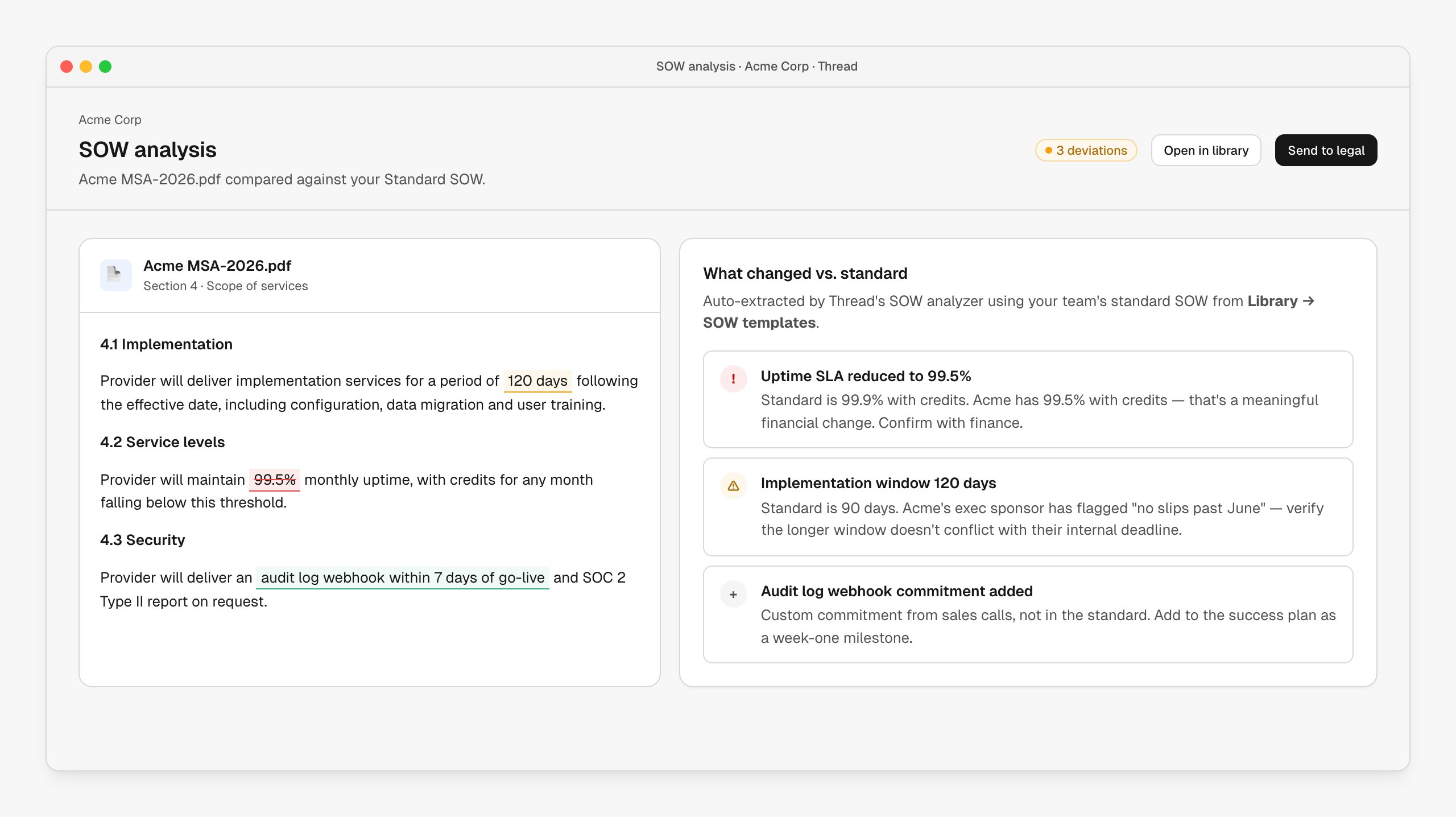
The customer's SOW on the left, the deviation report on the right. Inline highlights show what changed: red for terms reduced from your standard, green for additions, amber for items worth flagging. Each deviation has a severity, a one-line description, and (where possible) cross-referenced context from the sales calls.
The default analyzer ships in your **[Library → SOW templates](https://stitch.thread.app/home/library)** with a standard SOW you can edit to match your team's preferred terms. Custom commitments not in the standard — "we promised a webhook in week one" — are extracted as additions, not silently lost.
## How it's wired up
The analyzer runs on any document uploaded to the SOW slot on an account, or via a workflow node:
| Node | Role |
| -------------------------- | ----------------------------------------------------------------------- |
| **Upload SOW** | Customer-facing portal action — customer drops the signed SOW. |
| **Analyze SOW** | Compares against the standard and produces the deviation report. |
| **Notify legal / finance** | Conditional on severity — high deviations route to legal automatically. |
| **Add to success plan** | Custom commitments become tasks on the plan. |
The standard SOW is the source of truth for "normal." Replace it under **[Library → SOW templates](https://stitch.thread.app/home/library)** and every future analysis uses the new baseline.
## Customize the analyzer
The analyzer is fully customizable:
* Edit the standard SOW under **[Library](https://stitch.thread.app/home/library)** — every analysis runs against the latest version
* Tune severity thresholds for specific clauses (uptime, payment terms, IP)
* Add custom prompts ("flag any clause that touches data residency")
* Route different severities to different reviewers — high to legal, medium to the deal owner, informational to the CSM
The default analyzer covers a sensible set of clauses; teams running it for a few weeks usually customize the severities once and then leave it alone.
## When to use it
* Run on every signed SOW, not just the ones flagged for review. The 30-second cost is worth it.
* Especially valuable when sales has latitude to redline mid-deal, when SOWs vary by segment or geo, or when delivery teams have been bitten by hidden commitments.
## Next steps
Cross-reference SOW deviations against what was actually said on the calls.
SOW deviations show up in the handover brief automatically.
Custom commitments become tasks on the plan.
## What it looks like
The customer's SOW on the left, the deviation report on the right. Inline highlights show what changed: red for terms reduced from your standard, green for additions, amber for items worth flagging. Each deviation has a severity, a one-line description, and (where possible) cross-referenced context from the sales calls.
The default analyzer ships in your **[Library → SOW templates](https://stitch.thread.app/home/library)** with a standard SOW you can edit to match your team's preferred terms. Custom commitments not in the standard — "we promised a webhook in week one" — are extracted as additions, not silently lost.
## How it's wired up
The analyzer runs on any document uploaded to the SOW slot on an account, or via a workflow node:
| Node | Role |
| -------------------------- | ----------------------------------------------------------------------- |
| **Upload SOW** | Customer-facing portal action — customer drops the signed SOW. |
| **Analyze SOW** | Compares against the standard and produces the deviation report. |
| **Notify legal / finance** | Conditional on severity — high deviations route to legal automatically. |
| **Add to success plan** | Custom commitments become tasks on the plan. |
The standard SOW is the source of truth for "normal." Replace it under **[Library → SOW templates](https://stitch.thread.app/home/library)** and every future analysis uses the new baseline.
## Customize the analyzer
The analyzer is fully customizable:
* Edit the standard SOW under **[Library](https://stitch.thread.app/home/library)** — every analysis runs against the latest version
* Tune severity thresholds for specific clauses (uptime, payment terms, IP)
* Add custom prompts ("flag any clause that touches data residency")
* Route different severities to different reviewers — high to legal, medium to the deal owner, informational to the CSM
The default analyzer covers a sensible set of clauses; teams running it for a few weeks usually customize the severities once and then leave it alone.
## When to use it
* Run on every signed SOW, not just the ones flagged for review. The 30-second cost is worth it.
* Especially valuable when sales has latitude to redline mid-deal, when SOWs vary by segment or geo, or when delivery teams have been bitten by hidden commitments.
## Next steps
Cross-reference SOW deviations against what was actually said on the calls.
SOW deviations show up in the handover brief automatically.
Custom commitments become tasks on the plan.