> ## Documentation Index
> Fetch the complete documentation index at: https://docs.thread.app/llms.txt
> Use this file to discover all available pages before exploring further.
# Customer kickoff & onboarding
> Turn a closed deal into a live customer on a measurable timeline. Stepper-driven progress, automated next-actions, real first-value tracking.
Onboarding is the highest-leverage part of customer success. If you can compress time-to-first-value from weeks to days, every other CS metric improves. Thread's kickoff and onboarding experience is built around that single goal — drive the customer to first value as fast as the work allows, with no human bottleneck in between.
 ## What it looks like
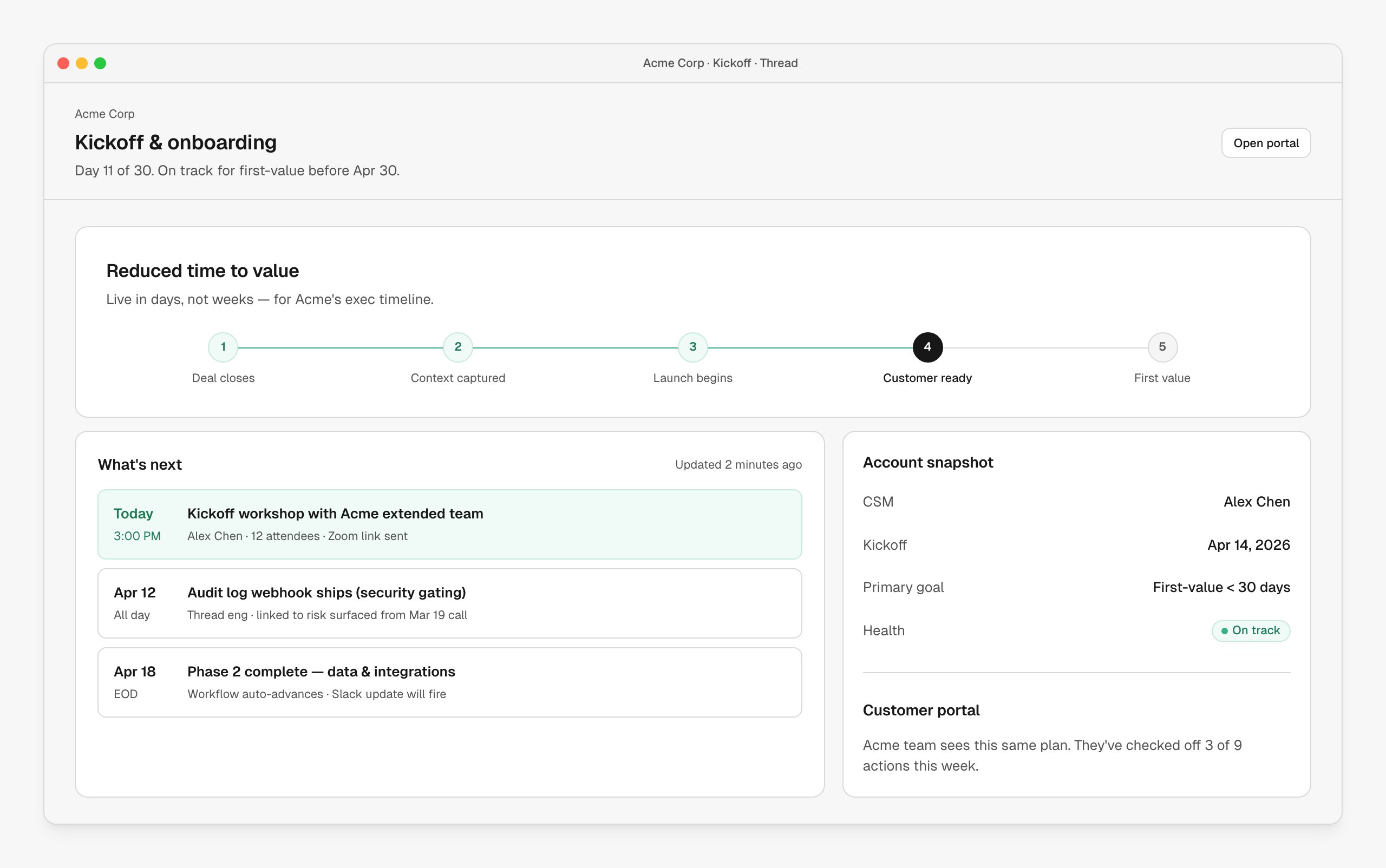
A top-level stepper marks the journey: deal closes → context captured → launch begins → customer ready → first value. Each step is an outcome, not a task. Underneath, the success plan drives the day-to-day work; the kickoff view shows what's next, who owns it, and the date.
When a milestone fires (phase complete, kickoff happens, first-value hit), the workflow does the next thing — posts to Slack, schedules the next meeting, drafts the next email — without a CSM needing to remember.
## How it's wired up
The end-to-end onboarding is one workflow:
| Node | Role |
| --------------------------------------- | -------------------------------------------------------- |
| **CRM trigger** | Closed Won fires the workflow. |
| **Handover brief** | AI drafts; AE reviews and submits. |
| **Route to CSM** | Account lands with the right CSM. |
| **Apply success plan** | Phases instantiate from a template. |
| **Send to Slack** | Customer-shared channel comes alive with status updates. |
| **Create Kantata project** *(optional)* | Services teams get a staffed project. |
| **Schedule kickoff** | Calendar invite pushed to the right attendees. |
Each milestone in the success plan can have its own action chain: when "Account setup" completes, post to Slack and email the kickoff agenda; when "Kickoff" happens, queue the week-one survey; when "First value" hits, fire the celebration message and schedule the QBR.
## Customize the experience
Everything you see in the screenshot is customizable per workflow:
* **Steppers** — name your phases (Deal Closes → Implementation → Live → Adoption → Renewal-ready, or whatever your motion is)
* **Success plan template** — different templates per segment or motion
* **Slack/email cadence** — fully editable per phase
* **First-value definition** — set the metric or event that means "they're getting it"
## When to use it
* Every onboarding, every time. This is the spine — handover, success plans, CSM assignment, SOW analysis all hang off it.
## Next steps
The first node in the kickoff workflow.
The plan that drives the work.
What the customer sees of all this.
The full node reference.
## What it looks like
A top-level stepper marks the journey: deal closes → context captured → launch begins → customer ready → first value. Each step is an outcome, not a task. Underneath, the success plan drives the day-to-day work; the kickoff view shows what's next, who owns it, and the date.
When a milestone fires (phase complete, kickoff happens, first-value hit), the workflow does the next thing — posts to Slack, schedules the next meeting, drafts the next email — without a CSM needing to remember.
## How it's wired up
The end-to-end onboarding is one workflow:
| Node | Role |
| --------------------------------------- | -------------------------------------------------------- |
| **CRM trigger** | Closed Won fires the workflow. |
| **Handover brief** | AI drafts; AE reviews and submits. |
| **Route to CSM** | Account lands with the right CSM. |
| **Apply success plan** | Phases instantiate from a template. |
| **Send to Slack** | Customer-shared channel comes alive with status updates. |
| **Create Kantata project** *(optional)* | Services teams get a staffed project. |
| **Schedule kickoff** | Calendar invite pushed to the right attendees. |
Each milestone in the success plan can have its own action chain: when "Account setup" completes, post to Slack and email the kickoff agenda; when "Kickoff" happens, queue the week-one survey; when "First value" hits, fire the celebration message and schedule the QBR.
## Customize the experience
Everything you see in the screenshot is customizable per workflow:
* **Steppers** — name your phases (Deal Closes → Implementation → Live → Adoption → Renewal-ready, or whatever your motion is)
* **Success plan template** — different templates per segment or motion
* **Slack/email cadence** — fully editable per phase
* **First-value definition** — set the metric or event that means "they're getting it"
## When to use it
* Every onboarding, every time. This is the spine — handover, success plans, CSM assignment, SOW analysis all hang off it.
## Next steps
The first node in the kickoff workflow.
The plan that drives the work.
What the customer sees of all this.
The full node reference.