> ## Documentation Index
> Fetch the complete documentation index at: https://docs.thread.app/llms.txt
> Use this file to discover all available pages before exploring further.
# CSM assignment
> Route accounts to the right CSM by ARR, region, segment or any field — round-robin, least-loaded, or named owner.
The fastest way to lose a customer's first impression is to take three days deciding who owns them. Thread's CSM assignment fires the moment the account is created — by rule, not by Slack thread.
 ## What it looks like
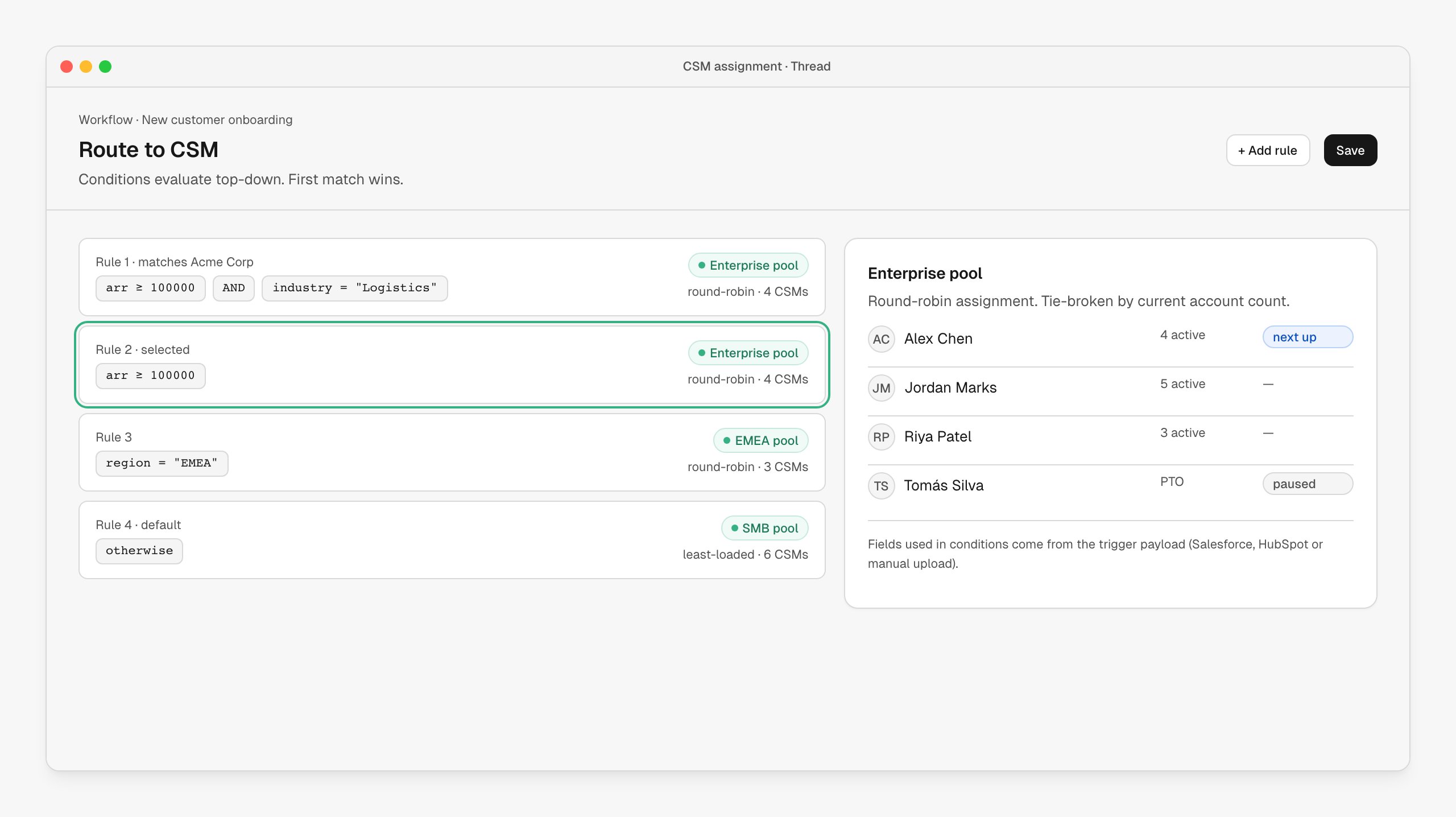
A list of ordered rules. Each rule has a condition (ARR, industry, region, segment, anything in the trigger payload) and a destination — a single CSM, a pool, or a queue. Conditions evaluate top-down; first match wins. The last rule is always the default.
Pools support round-robin and least-loaded distribution. CSMs on PTO are paused automatically. Reassignments happen in the same UI — pick a different CSM and the account, plan, brief and notifications follow them.
## How it's wired up
The **Route to CSM** node lives in any workflow downstream of an account-creating trigger. Edit your routing under **[Workflows](https://stitch.thread.app/home/workflows)**.
| Field | Behavior |
| ---------------------- | ---------------------------------------------------------------------------- |
| **Rules** | Ordered list. Each is a condition + destination. |
| **Pool destinations** | Round-robin or least-loaded. Optionally tie-broken by current account count. |
| **Named destinations** | Pin specific accounts to specific CSMs (great for strategic accounts). |
| **Fallback** | Required — every account ends up assigned, even if no rule matches. |
Conditions read from whatever the trigger captured: Salesforce or HubSpot fields, manual upload columns, or values set by upstream workflow nodes.
## Customize the routing
Routing is a per-workflow configuration — you can have different routing in your "New customer" workflow vs your "Renewal at risk" workflow vs your "Self-serve upgrade" workflow.
* Pools are reusable across workflows
* A rule can route to a single CSM, a pool, or a queue (queues notify multiple CSMs and let one claim)
* Add manager approval on certain rules (high-value deals, weird fits) before assignment finalizes
## When to use it
* Whenever you have more than two CSMs and any segmentation. Even simple "Enterprise / SMB" splits benefit from explicit rules.
* Especially when AEs and CSMs are different teams — assignment by rule removes the "who picks this up?" ambiguity.
## Next steps
The brief lands in the assigned CSM's queue.
Most common trigger feeding routing rules.
Notify the CSM the moment they're assigned.
## What it looks like
A list of ordered rules. Each rule has a condition (ARR, industry, region, segment, anything in the trigger payload) and a destination — a single CSM, a pool, or a queue. Conditions evaluate top-down; first match wins. The last rule is always the default.
Pools support round-robin and least-loaded distribution. CSMs on PTO are paused automatically. Reassignments happen in the same UI — pick a different CSM and the account, plan, brief and notifications follow them.
## How it's wired up
The **Route to CSM** node lives in any workflow downstream of an account-creating trigger. Edit your routing under **[Workflows](https://stitch.thread.app/home/workflows)**.
| Field | Behavior |
| ---------------------- | ---------------------------------------------------------------------------- |
| **Rules** | Ordered list. Each is a condition + destination. |
| **Pool destinations** | Round-robin or least-loaded. Optionally tie-broken by current account count. |
| **Named destinations** | Pin specific accounts to specific CSMs (great for strategic accounts). |
| **Fallback** | Required — every account ends up assigned, even if no rule matches. |
Conditions read from whatever the trigger captured: Salesforce or HubSpot fields, manual upload columns, or values set by upstream workflow nodes.
## Customize the routing
Routing is a per-workflow configuration — you can have different routing in your "New customer" workflow vs your "Renewal at risk" workflow vs your "Self-serve upgrade" workflow.
* Pools are reusable across workflows
* A rule can route to a single CSM, a pool, or a queue (queues notify multiple CSMs and let one claim)
* Add manager approval on certain rules (high-value deals, weird fits) before assignment finalizes
## When to use it
* Whenever you have more than two CSMs and any segmentation. Even simple "Enterprise / SMB" splits benefit from explicit rules.
* Especially when AEs and CSMs are different teams — assignment by rule removes the "who picks this up?" ambiguity.
## Next steps
The brief lands in the assigned CSM's queue.
Most common trigger feeding routing rules.
Notify the CSM the moment they're assigned.