> ## Documentation Index
> Fetch the complete documentation index at: https://docs.thread.app/llms.txt
> Use this file to discover all available pages before exploring further.
# What is Thread?
> Thread is the customer success platform built around workflows. Trigger from your CRM, draft handovers, run kickoff, customize plans per account, and give customers a portal that's actually useful.
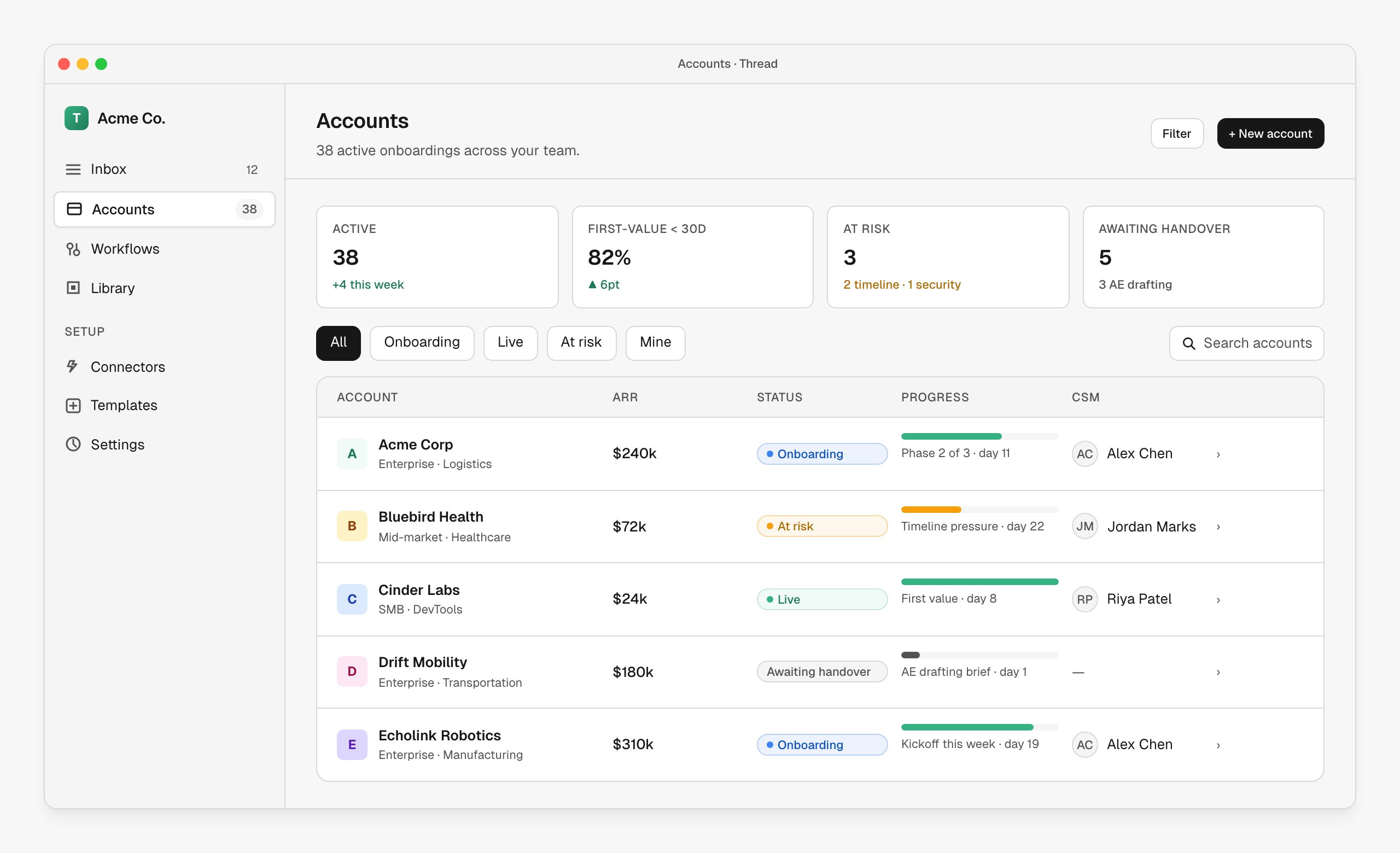
Thread is the customer success platform built around **workflows**. Wire your CRM, calls and documents into one place, and Thread orchestrates everything that happens after a deal closes — handover briefs drafted from the actual sales calls, success plans tailored to the customer, the right CSM assigned by rule, kickoff scheduled, and a customer portal that mirrors the plan in real time.
 ## What you build with Thread
AE → CSM briefs auto-drafted from CRM context and call transcripts, with the questions you actually want answered.
Phased plans with owners, milestones and dates — customizable per account, mirrored to the customer portal.
Route accounts by ARR, region, segment or any field — round-robin, least-loaded, or named owner.
Compare every signed SOW against your standard. Surface deviations, custom commitments and risk before kickoff.
Turn a closed deal into a live customer on a measurable timeline. First-value, not first-meeting.
Branded, customer-facing portal that's the source of truth for the plan and what's next.
## How it works
Thread sits between your CRM and your customer experience. One workflow drives the journey from "deal closes" to "customer is live."
### 1. A deal closes in your CRM
Connect Salesforce, HubSpot or any of the other [integrations](/integrations/overview) and Thread reacts the moment a stage changes. No copying data, no manual upload — the trigger fires, the workflow runs.
## What you build with Thread
AE → CSM briefs auto-drafted from CRM context and call transcripts, with the questions you actually want answered.
Phased plans with owners, milestones and dates — customizable per account, mirrored to the customer portal.
Route accounts by ARR, region, segment or any field — round-robin, least-loaded, or named owner.
Compare every signed SOW against your standard. Surface deviations, custom commitments and risk before kickoff.
Turn a closed deal into a live customer on a measurable timeline. First-value, not first-meeting.
Branded, customer-facing portal that's the source of truth for the plan and what's next.
## How it works
Thread sits between your CRM and your customer experience. One workflow drives the journey from "deal closes" to "customer is live."
### 1. A deal closes in your CRM
Connect Salesforce, HubSpot or any of the other [integrations](/integrations/overview) and Thread reacts the moment a stage changes. No copying data, no manual upload — the trigger fires, the workflow runs.
 ### 2. The workflow runs
Each workflow is a chain of nodes: triggers, branches, AI drafts, human reviews, action sends, integrations. Drop them on a canvas and Thread handles the choreography.
### 2. The workflow runs
Each workflow is a chain of nodes: triggers, branches, AI drafts, human reviews, action sends, integrations. Drop them on a canvas and Thread handles the choreography.
 ### 3. The handover lands ready to review
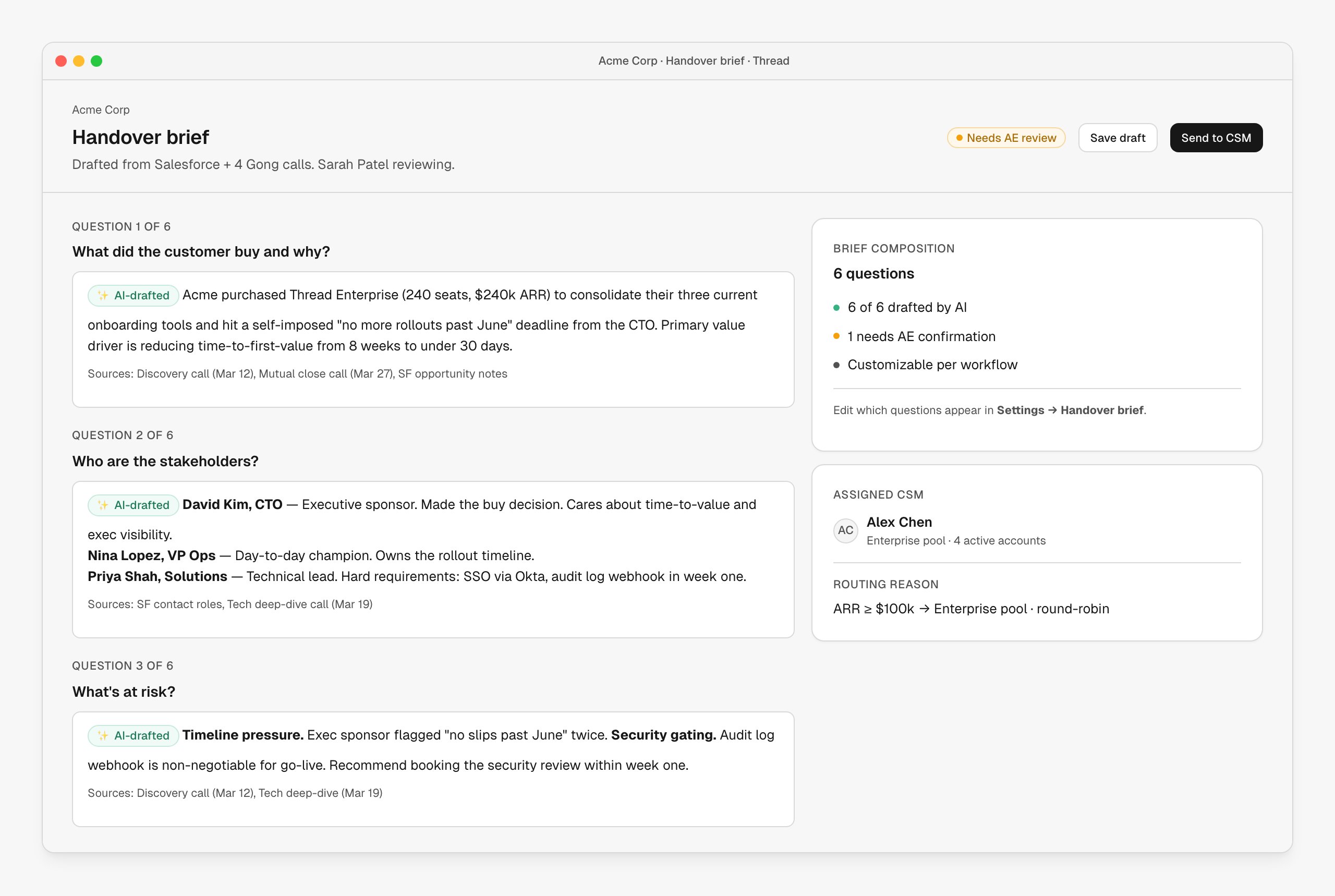
The brief is drafted from the CRM payload, linked Gong calls and any uploaded SOW — every answer cites its sources. The AE reviews, edits, submits. The CSM lands on an account that already knows the answers.
### 3. The handover lands ready to review
The brief is drafted from the CRM payload, linked Gong calls and any uploaded SOW — every answer cites its sources. The AE reviews, edits, submits. The CSM lands on an account that already knows the answers.
 ### 4. Onboarding kicks off — for both sides
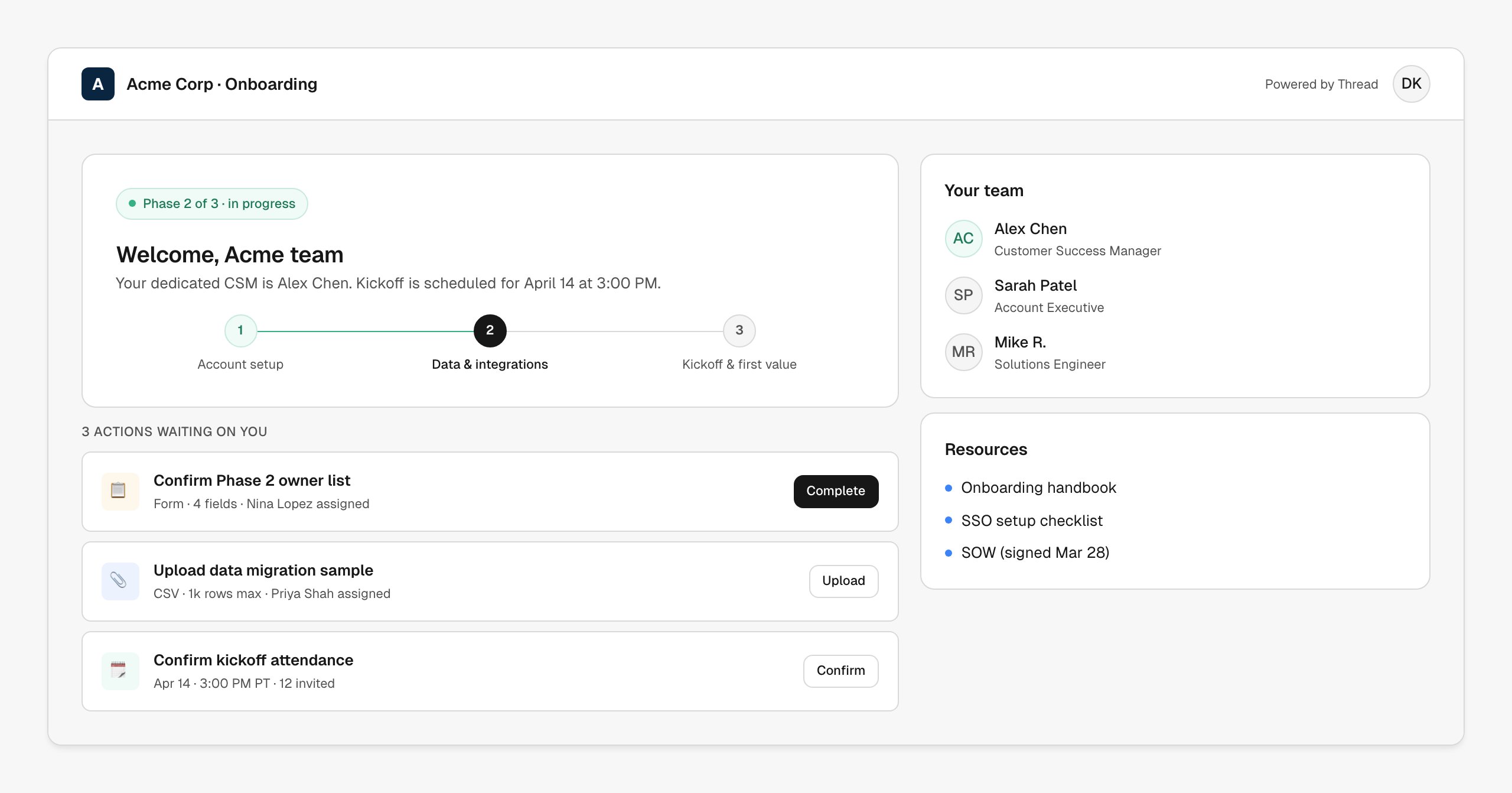
The CSM sees the success plan in their workspace. The customer sees a branded portal — same plan, same milestones, same actions, mirrored in real time.
The stepper, what's next, and the action queue.
What your customer sees of the same plan.
### 4. Onboarding kicks off — for both sides
The CSM sees the success plan in their workspace. The customer sees a branded portal — same plan, same milestones, same actions, mirrored in real time.
The stepper, what's next, and the action queue.
What your customer sees of the same plan.
 ## Connects to your stack
Thread reads from your CRM, your call recordings and your collaboration tools — and writes back to Slack, email, calendars and your services PSA when a workflow tells it to.
| Tool | What Thread does |
| ------------------------------------------------------ | ------------------------------------------------------------------------ |
| **[Salesforce](/integrations/salesforce)** | Trigger workflows from opportunity stage changes; pull rich CRM context. |
| **[HubSpot](/integrations/hubspot)** | Trigger workflows from deal stages; sync companies and contacts. |
| **[Gong](/integrations/gong)** | Pipe call transcripts and insights into briefs, plans and SOW analysis. |
| **[Slack](/integrations/slack)** | Post updates to shared channels, alert CSMs, broadcast handovers. |
| **[Kantata](/integrations/kantata)** | Spin up services projects with role-based resourcing. |
| **[Notion](/integrations/notion)** | Use Notion databases as a trigger source. |
| **[Google Workspace](/integrations/google-workspace)** | Send branded email, create docs, schedule kickoff meetings. |
| **[Microsoft](/integrations/microsoft)** | Calendar and email through Microsoft 365 / Teams. |
| **[Zoom](/integrations/zoom)** | Schedule and track customer calls. |
## Get started
Up and running in 10 minutes — connect a CRM, build your first workflow.
Templates, workflows, milestones, actions — the vocabulary in 5 minutes.
Walk-throughs of the six experiences Thread is built around.
Connect Thread to the tools your team already uses.
## Connects to your stack
Thread reads from your CRM, your call recordings and your collaboration tools — and writes back to Slack, email, calendars and your services PSA when a workflow tells it to.
| Tool | What Thread does |
| ------------------------------------------------------ | ------------------------------------------------------------------------ |
| **[Salesforce](/integrations/salesforce)** | Trigger workflows from opportunity stage changes; pull rich CRM context. |
| **[HubSpot](/integrations/hubspot)** | Trigger workflows from deal stages; sync companies and contacts. |
| **[Gong](/integrations/gong)** | Pipe call transcripts and insights into briefs, plans and SOW analysis. |
| **[Slack](/integrations/slack)** | Post updates to shared channels, alert CSMs, broadcast handovers. |
| **[Kantata](/integrations/kantata)** | Spin up services projects with role-based resourcing. |
| **[Notion](/integrations/notion)** | Use Notion databases as a trigger source. |
| **[Google Workspace](/integrations/google-workspace)** | Send branded email, create docs, schedule kickoff meetings. |
| **[Microsoft](/integrations/microsoft)** | Calendar and email through Microsoft 365 / Teams. |
| **[Zoom](/integrations/zoom)** | Schedule and track customer calls. |
## Get started
Up and running in 10 minutes — connect a CRM, build your first workflow.
Templates, workflows, milestones, actions — the vocabulary in 5 minutes.
Walk-throughs of the six experiences Thread is built around.
Connect Thread to the tools your team already uses.