> ## Documentation Index
> Fetch the complete documentation index at: https://docs.thread.app/llms.txt
> Use this file to discover all available pages before exploring further.
# Kantata (coming soon)
> Spin up Kantata projects automatically when deals close. Resource by role, sync milestones, and link projects back to the Salesforce opportunity.
Kantata support is **coming soon**. The pages below describe how it will work — get in touch if you want early access.
If your services team runs in Kantata (formerly Mavenlink) and your CS team runs in Thread, the gap between "deal closed" and "project staffed" is where weeks get lost. Connecting Kantata closes it: the moment Closed Won fires, Thread can stand up the project, allocate hours by role, and hand the PM a ready-to-run delivery plan.
 ## What you can build
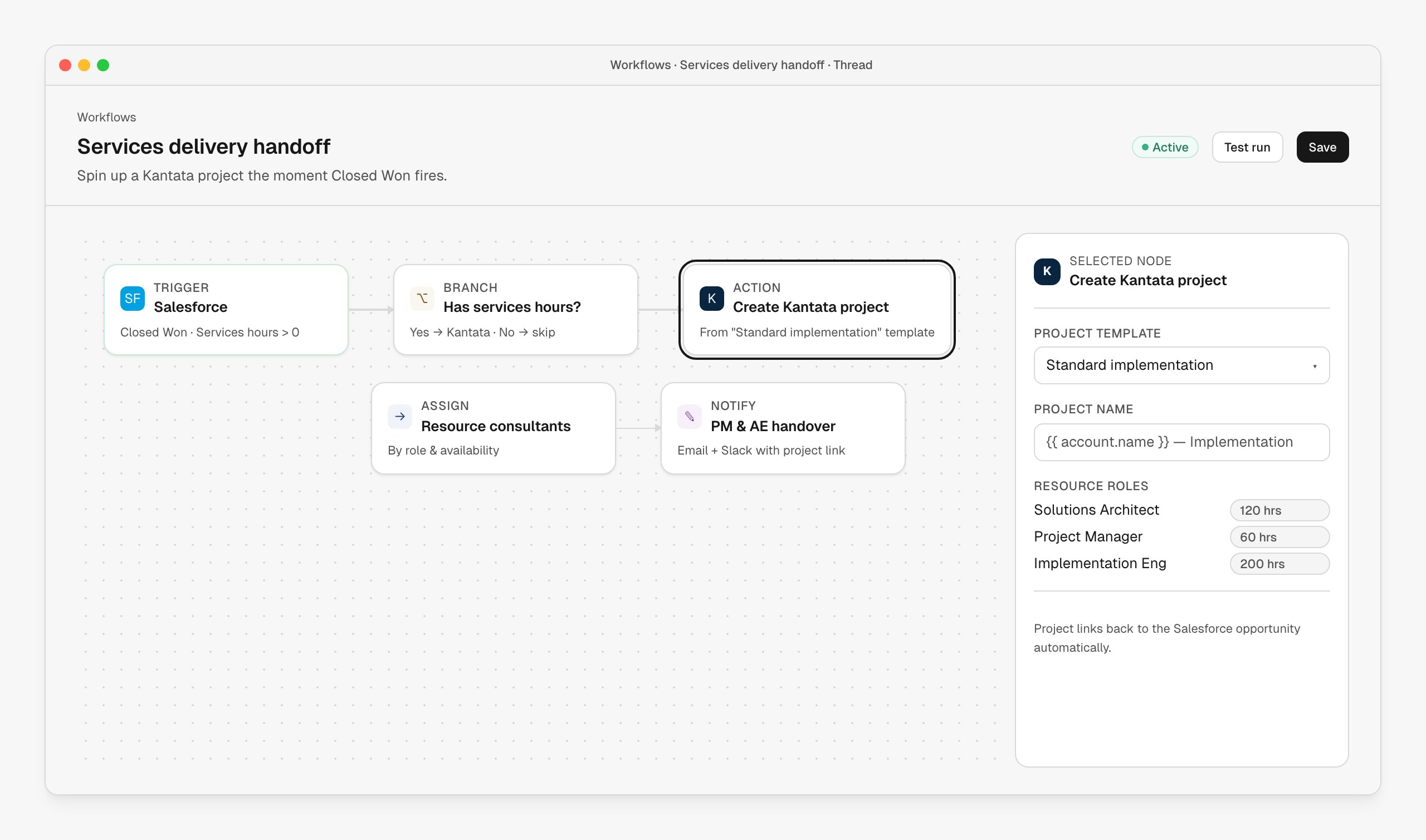
A single workflow that spins up the Kantata project, applies the success plan, and books the kickoff call.
Resource consultants by role and availability — not by who replied first to a Slack message.
Keep the Kantata project plan and the Thread success plan in sync so customers see one truth.
Hand the PM a project that already knows the scope, owner and exec context.
## Connect Kantata
Go to **[Connectors → Kantata](https://stitch.thread.app/home/connectors/kantata)** in Thread, click **Connect**, and sign in to Kantata as an account admin to approve the OAuth scope. Thread connects via the legacy `app.mavenlink.com` OAuth domain — that's expected; Kantata still uses the Mavenlink OAuth host.
Under **[Connectors → Kantata](https://stitch.thread.app/home/connectors/kantata)**, choose which Kantata project template Thread instantiates by default. You can override per-workflow.
Tell Thread which Kantata roles correspond to "Solutions Architect", "Project Manager", "Implementation Engineer" etc. so role-based allocations apply correctly when projects are created.
## Use Kantata in a workflow
Drop a **Create Kantata project** action node anywhere downstream of an account-creating trigger. The node takes:
| Field | What it does |
| -------------------------- | ------------------------------------------------------------------------------------- |
| **Project template** | The Kantata template to clone from (e.g. "Standard implementation"). |
| **Project name** | Supports variables — `{{ account.name }} — Implementation` is the common pattern. |
| **Resource roles & hours** | Hours per role; Kantata resourcing then assigns specific consultants by availability. |
| **Linked opportunity** | Auto-set from the Salesforce trigger upstream. Lives on the project for traceability. |
A common pattern: gate the action on a **services hours > 0** branch off the Salesforce trigger, so non-services deals don't accidentally create empty Kantata projects.
## Tips from the field
Enterprise vs SMB usually need different role mixes. Branch by ARR and pick the template up front.
Role-based allocations survive team changes. Hardcoded names don't.
The opportunity link lives on the Kantata project so finance and delivery share one ID.
Add a Slack or email handover step right after project creation so the PM isn't surprised.
## Troubleshooting
Confirm the Kantata client ID configured for your environment matches the OAuth app you're authorizing against. Sandbox/staging Kantata accounts need a separate client ID.
Role mappings haven't been set, or the roles in the Kantata template don't match what Thread is sending. Check **[Connectors → Kantata](https://stitch.thread.app/home/connectors/kantata) → Role mapping**.
The action only links automatically when the workflow is triggered by a Salesforce node upstream. For HubSpot or manual triggers, set the opportunity reference explicitly in the action's inspector.
Disconnecting stops new project creation but does not affect existing Kantata projects. Tokens are revoked from Kantata's side; reconnect from **[Connectors → Kantata](https://stitch.thread.app/home/connectors/kantata)** to restore the integration.
## Next steps
The full services-handoff workflow, from Closed Won to staffed project.
The most common upstream trigger for Kantata project creation.
## What you can build
A single workflow that spins up the Kantata project, applies the success plan, and books the kickoff call.
Resource consultants by role and availability — not by who replied first to a Slack message.
Keep the Kantata project plan and the Thread success plan in sync so customers see one truth.
Hand the PM a project that already knows the scope, owner and exec context.
## Connect Kantata
Go to **[Connectors → Kantata](https://stitch.thread.app/home/connectors/kantata)** in Thread, click **Connect**, and sign in to Kantata as an account admin to approve the OAuth scope. Thread connects via the legacy `app.mavenlink.com` OAuth domain — that's expected; Kantata still uses the Mavenlink OAuth host.
Under **[Connectors → Kantata](https://stitch.thread.app/home/connectors/kantata)**, choose which Kantata project template Thread instantiates by default. You can override per-workflow.
Tell Thread which Kantata roles correspond to "Solutions Architect", "Project Manager", "Implementation Engineer" etc. so role-based allocations apply correctly when projects are created.
## Use Kantata in a workflow
Drop a **Create Kantata project** action node anywhere downstream of an account-creating trigger. The node takes:
| Field | What it does |
| -------------------------- | ------------------------------------------------------------------------------------- |
| **Project template** | The Kantata template to clone from (e.g. "Standard implementation"). |
| **Project name** | Supports variables — `{{ account.name }} — Implementation` is the common pattern. |
| **Resource roles & hours** | Hours per role; Kantata resourcing then assigns specific consultants by availability. |
| **Linked opportunity** | Auto-set from the Salesforce trigger upstream. Lives on the project for traceability. |
A common pattern: gate the action on a **services hours > 0** branch off the Salesforce trigger, so non-services deals don't accidentally create empty Kantata projects.
## Tips from the field
Enterprise vs SMB usually need different role mixes. Branch by ARR and pick the template up front.
Role-based allocations survive team changes. Hardcoded names don't.
The opportunity link lives on the Kantata project so finance and delivery share one ID.
Add a Slack or email handover step right after project creation so the PM isn't surprised.
## Troubleshooting
Confirm the Kantata client ID configured for your environment matches the OAuth app you're authorizing against. Sandbox/staging Kantata accounts need a separate client ID.
Role mappings haven't been set, or the roles in the Kantata template don't match what Thread is sending. Check **[Connectors → Kantata](https://stitch.thread.app/home/connectors/kantata) → Role mapping**.
The action only links automatically when the workflow is triggered by a Salesforce node upstream. For HubSpot or manual triggers, set the opportunity reference explicitly in the action's inspector.
Disconnecting stops new project creation but does not affect existing Kantata projects. Tokens are revoked from Kantata's side; reconnect from **[Connectors → Kantata](https://stitch.thread.app/home/connectors/kantata)** to restore the integration.
## Next steps
The full services-handoff workflow, from Closed Won to staffed project.
The most common upstream trigger for Kantata project creation.