> ## Documentation Index
> Fetch the complete documentation index at: https://docs.thread.app/llms.txt
> Use this file to discover all available pages before exploring further.
# Gong
> Pull sales call transcripts and insights into Thread so handover briefs, success plans and risk surfacing all start with real customer context.
The hardest part of a customer handoff is everything that happened in the sales cycle but never got written down. Gong fixes that. Connecting it pipes call transcripts and insights into every account in Thread — and into the AI that drafts your handover briefs, success plans and SOW reviews.
 ## What you can build
Brief drafts that quote the actual sales calls, with stakeholders and risks pulled from transcripts.
Plans tailored to what the customer actually said they wanted, not a generic template.
Compare what was promised on calls against what's in the SOW. Surface mismatches before kickoff.
Pull timeline pressure, exec doubts and competitor mentions into the account view automatically.
## Connect Gong
Go to **[Connectors → Gong](https://stitch.thread.app/home/connectors/gong)** in Thread, click **Connect**, and sign in to Gong as an admin to approve the OAuth scope. Thread reads call metadata, transcripts and insights — recordings stay in Gong and play back from there.
Under **[Connectors → Gong](https://stitch.thread.app/home/connectors/gong)**, pick a scope: **All recordings**, **Selected teams**, or **Deal-associated only**. Gong's own permission model still applies — users only see what they could see in Gong.
Thread auto-links calls to accounts by attendee email and company domain. New calls match within minutes of the transcript landing in Gong.
## What ends up on the account
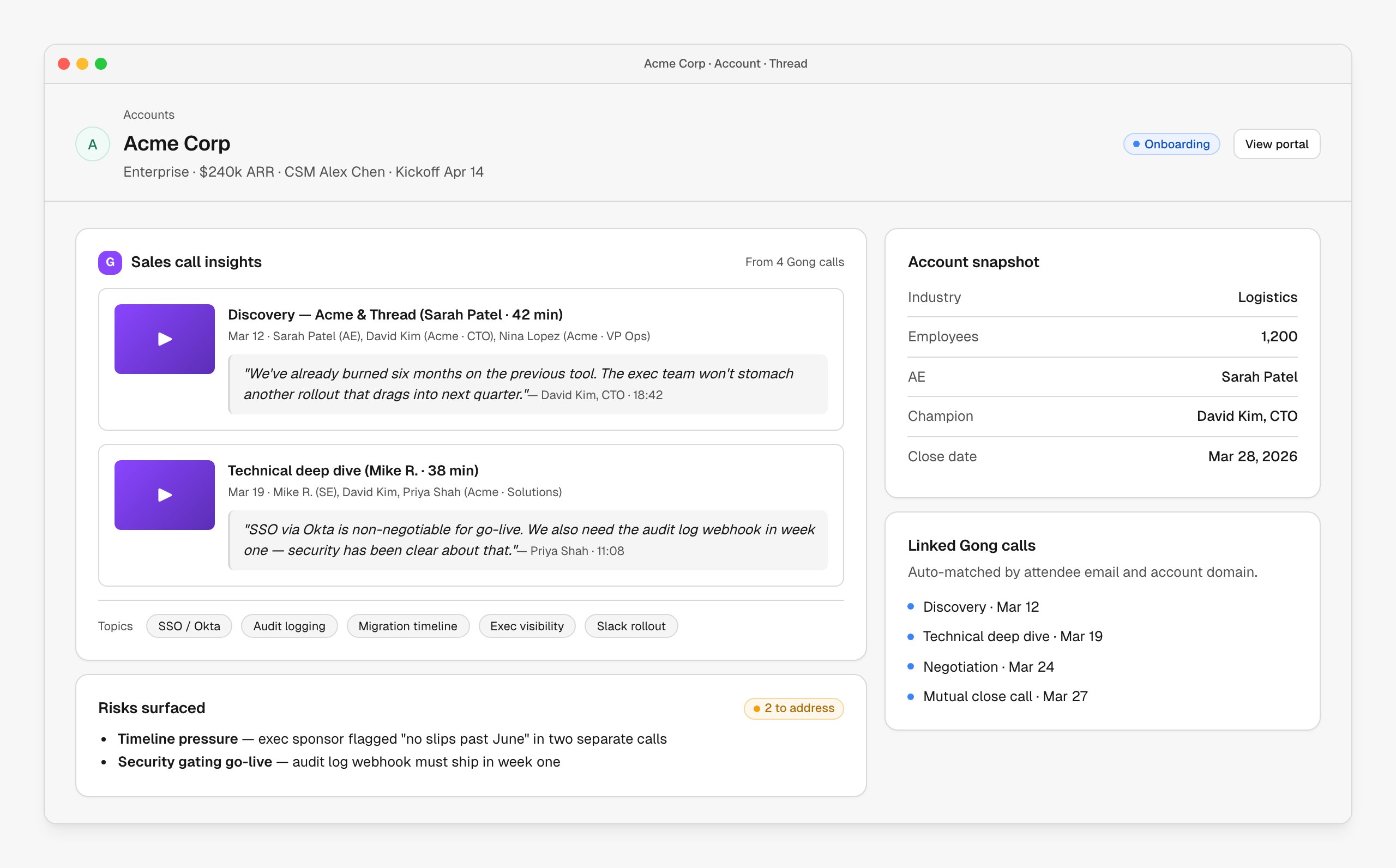
Open any account in Thread and the right calls are already attached. Quotes flow into the handover draft, topics turn into pills, and recurring concerns get pulled into a "Risks surfaced" panel.
| Source | Where it shows up |
| ------------------------------------- | ---------------------------------------------------- |
| Call metadata (date, attendees, type) | Linked calls list on the account |
| Full transcript | Searchable inside the account; piped into AI prompts |
| Topic & question insights | Topic pills under the call insights panel |
| Sentiment / next steps | Risks and action items panels |
## Tips from the field
Gong calls connected to a CRM deal match more reliably than calls keyed by email alone.
Call titles like "Discovery — Acme & Thread" beat "Sales call." It's what shows up in the brief.
Five minutes scanning the call insights panel saves twenty minutes in the kickoff meeting.
Timeline pressure, security gating and exec doubt are all worth catching before week one.
## Troubleshooting
Calls match by attendee email and company domain. If the AE used a personal Zoom account or the CRM contact email doesn't match the call attendees, links won't form. Add the right contact in Salesforce/HubSpot, or link a call manually from the account view.
Gong only generates transcripts for recorded calls, and processing can lag a few minutes after the call ends. If a recording is older than a day and still has no transcript, check the recording's settings in Gong.
Confirm you have Gong admin permissions and that API access is enabled on the org. Reconnecting from **[Connectors → Gong](https://stitch.thread.app/home/connectors/gong)** issues a fresh token.
## Next steps
See how call transcripts power the AI-drafted handover brief.
Bring call commitments into a SOW review.
## What you can build
Brief drafts that quote the actual sales calls, with stakeholders and risks pulled from transcripts.
Plans tailored to what the customer actually said they wanted, not a generic template.
Compare what was promised on calls against what's in the SOW. Surface mismatches before kickoff.
Pull timeline pressure, exec doubts and competitor mentions into the account view automatically.
## Connect Gong
Go to **[Connectors → Gong](https://stitch.thread.app/home/connectors/gong)** in Thread, click **Connect**, and sign in to Gong as an admin to approve the OAuth scope. Thread reads call metadata, transcripts and insights — recordings stay in Gong and play back from there.
Under **[Connectors → Gong](https://stitch.thread.app/home/connectors/gong)**, pick a scope: **All recordings**, **Selected teams**, or **Deal-associated only**. Gong's own permission model still applies — users only see what they could see in Gong.
Thread auto-links calls to accounts by attendee email and company domain. New calls match within minutes of the transcript landing in Gong.
## What ends up on the account
Open any account in Thread and the right calls are already attached. Quotes flow into the handover draft, topics turn into pills, and recurring concerns get pulled into a "Risks surfaced" panel.
| Source | Where it shows up |
| ------------------------------------- | ---------------------------------------------------- |
| Call metadata (date, attendees, type) | Linked calls list on the account |
| Full transcript | Searchable inside the account; piped into AI prompts |
| Topic & question insights | Topic pills under the call insights panel |
| Sentiment / next steps | Risks and action items panels |
## Tips from the field
Gong calls connected to a CRM deal match more reliably than calls keyed by email alone.
Call titles like "Discovery — Acme & Thread" beat "Sales call." It's what shows up in the brief.
Five minutes scanning the call insights panel saves twenty minutes in the kickoff meeting.
Timeline pressure, security gating and exec doubt are all worth catching before week one.
## Troubleshooting
Calls match by attendee email and company domain. If the AE used a personal Zoom account or the CRM contact email doesn't match the call attendees, links won't form. Add the right contact in Salesforce/HubSpot, or link a call manually from the account view.
Gong only generates transcripts for recorded calls, and processing can lag a few minutes after the call ends. If a recording is older than a day and still has no transcript, check the recording's settings in Gong.
Confirm you have Gong admin permissions and that API access is enabled on the org. Reconnecting from **[Connectors → Gong](https://stitch.thread.app/home/connectors/gong)** issues a fresh token.
## Next steps
See how call transcripts power the AI-drafted handover brief.
Bring call commitments into a SOW review.